draft · v0.1.226
💬Comments welcome. To leave a note, select any text and click the note / highlight button that pops up — or open the panel with the tab at the top-right (‹). Notes are visible only inside our private review group.
Computational Photography, an AI-powered Slopendium — 01 Intro
Frédo Durand, MIT · Version 0.2.52
expand to📖 Full book outline1 parts · 5 chapters · 16 sections · 4 figures embedded · 0 placeholders · double-click a figure to enlarge
Part 1 INTRO
1.1 From Digital to Computational Photography
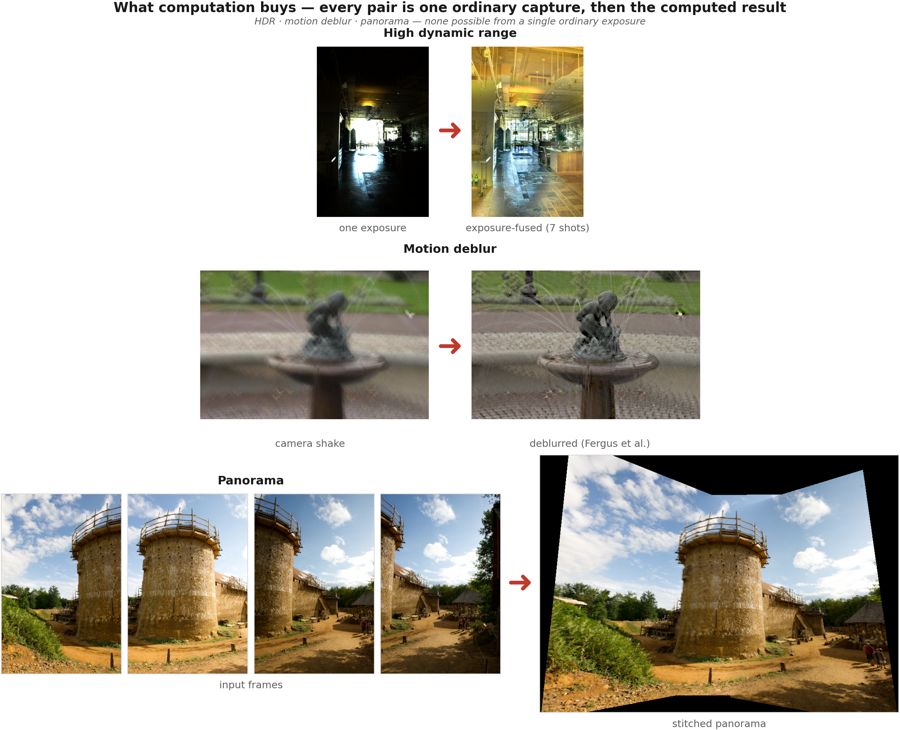
fig-results-montage
fig-results-montage · a montage of computational-photography results — HDR tone mapping, refocus-after-capture, motion deblur, a stitched panorama — the "look what computation buys you" opener
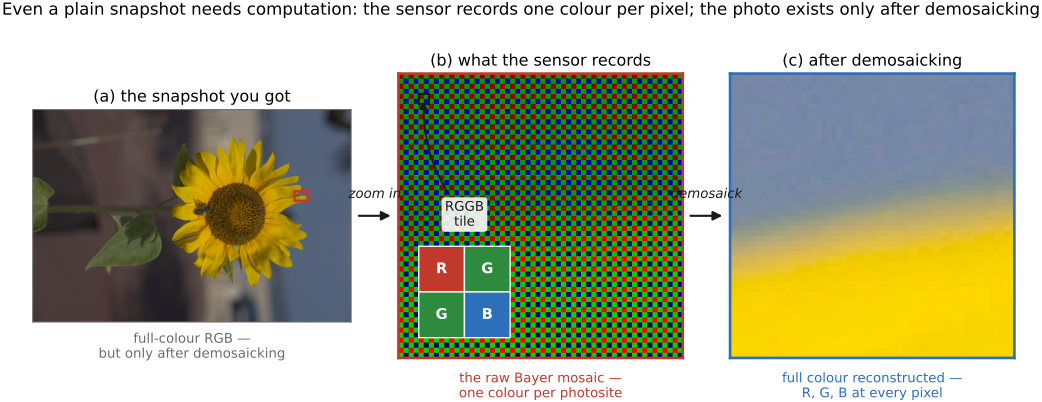
fig-demosaick-snapshot
fig-demosaick-snapshot · even a plain snapshot needs computation: one colour per pixel (Bayer mosaic) → demosaicked RGB
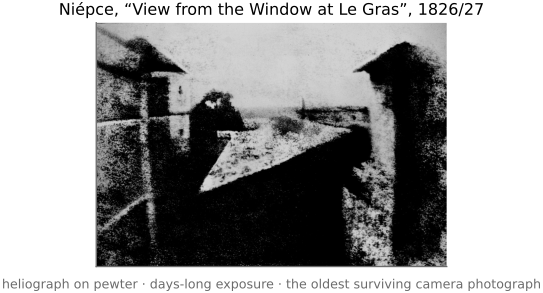
fig-first-photograph
fig-first-photograph ·
At first, the digital revolution merely replaced film by digital sensors more amenable to quick snapshots, instant gratification and sharing. But it did more than that : it created the opportunity to add arbitrary computation between the photons in a scene and the final image.
This allows us to do really cool stuff : manage scenes where contrast is excessive, computationally remove blur, combine images into virtual wide angle panoramas, and even capture the full array of light to do stuff like refocusing after the fact and extract 3D.
[results-montage figure — HDR tone mapping (Durand et al.), refocus-after-capture (Ng et al.), motion deblur (Levin et al.), panorama (problem set)]
In fact, even a simple snapshot requires serious computation because each pixel usually captures only one of the 3 channels and the other two need to be reconstructed [demosaick-snapshot figure]. Cell phones these days take much better images than they have a right to because of computational photography.
Plus generative AI is poised to further revolutionize photography and image making with its ability to learn the space of all possible images in a manner reminiscent of a Borges novella (cite *The Library of Babel* and https://arxiv.org/abs/2310.01425)
1.1.3 What makes a technique useful
1.1.5 Does photography still matter in the age of generative AI?
1.1.8 Neighbouring fields, and where the work is published
1.2 How to read this book
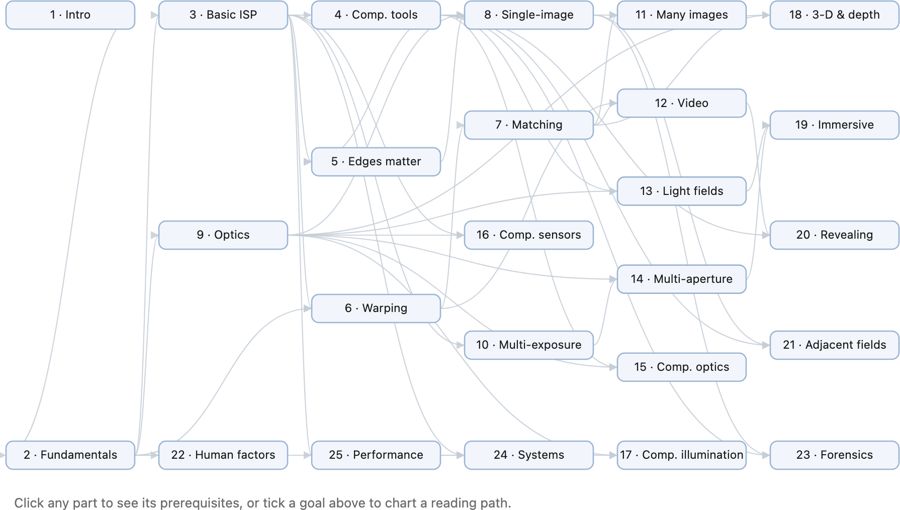
fig-chapter-dependency-graph
fig-chapter-dependency-graph · graph of chapter dependencies (provides/requires) so a reader can chart a path 🟨
• the book is organized **cross-cuttingly**: a chapter is sometimes a **tool** (convolution, the bilateral filter), sometimes a **big idea** (priors, the light field), and the major themes deliberately **recur** across chapters — the same lesson seen from several angles. The redundancy is intentional; cross-references thread the pieces together.
• **hammers and nails**: we deliberately sought a **balance between "hammers and nails"** — between **tools/techniques** (the hammers: convolution, the bilateral filter, optimization, priors) and **applications/challenges** (the nails: HDR, panoramas, deblurring, refocusing). Rather than a purely tool-first or purely application-first table of contents, the book's structure is **organized by a combination of tools and applications/challenges**, alternating between the two so each motivates the other.
• **intuition first**: lead with the idea and a picture, then the math. The audience is a **CS undergrad**, new to imaging (what to know coming in is spelled out in *[[#Prerequisites]]* below).
• **how to read**: FUNDAMENTALS grounds the physics and perception; BASIC IMAGE PROCESSING gives the toolkit; later parts build single- and multi-image computational photography. Read mostly front-to-back, or follow the dependency graph below to chart your own path.
• **how this book came to be**:
• grew out of Frédo's **computational photography course** at MIT — its lectures, slides, and problem sets are this book's backbone.
• written **with an AI collaborator** (Claude) as a deliberate experiment in **AI-assisted authoring** — the outline, figures, drafts, and the book's own tooling were co-developed; a fitting, slightly meta nod to the generative-AI theme the book itself discusses.
• the **process** (how outline, figures, and prose are generated, verified, and kept consistent) is documented in an appendix — itself a small piece of AI methodology [forward ref: "how this book was created"].
• **chapter dependency graph**:
• *(placeholder — to create later)* a **graph of chapter dependencies** belongs here, at the end of the intro: a diagram showing which chapters rely on which, so a reader can chart their own path through the book. Generate it from the **provides / requires** graph (see [[Book Generation Process#Cross-chapter dependencies]] and each section's `- prereqs:`), once enough of the book is written for the dependencies to be stable.
1.2.1 A book for machines, too
1.3 How this book was made
• a **short, intro-level** chapter (the headline version of the appendix [[Appendices#How this book was created]]): the book is partly *about* generative AI and was partly written *with* it, so the making-of is part of the story, not a footnote.
• **where it came from**: grew out of Frédo's MIT computational photography course — ~**305k words** of auto-captured/auto-transcribed lecture transcripts, ~**114k** of slide decks, ~**42k** of problem sets (~**460k** of pre-existing teaching material) form the backbone.
• **how it was written**: drafted **with an AI collaborator** (Claude); outline/prose split with a compile step; figures are programs; the human edits triage back so re-compiling reproduces the corrections.
• **who did what**: AI for laborious-but-specified drafting, figure code, and bookkeeping; human for structure, judgment, catching subtle errors, and ownership of every claim.
• **the numbers, honestly**: ~**40.5k words** of typed prompts steered ~**735k words** of generated outline+prose (≈13–18× leverage, *not* authorship); the outline is model output too, so the earlier "2.2× human writing" framing was wrong — the real human contribution is **curation**, not keystrokes. Point to the two appendices for the full account and the under-the-hood prompts/verifiers.
1.4 What programming language for computational photography?
• the book is **language-agnostic in its ideas** but ships in two editions — a **Python** one and a **C++** one (never one book showing both) — because the two languages serve different moments: Python to *think and prototype*, C++ to *ship and run fast*. The concepts are identical; pick the edition that matches your goal.
• **why choose which**: **Python** for **deep learning, prototyping, and convenience**; **C++** for **performance**. The gap is not small. When you write the **low-level code yourself** (e.g. your own convolution rather than a library call), the **speed differential** is dramatic: in Frédo's experience, roughly **1000× from Python to optimized C++**, and **at least another ~10× from C++ to Halide**. So the language choice is also a performance choice — see [[Performance engineering and Halide]] and [[Appendices#Programming: Python, C++, and PyTorch]].
• **Python** — the right default for *learning, prototyping, and research*:
• **pros**: **readable** — NumPy array code reads almost like the math (`out = a + 0.5*b`); **fast to write and explore**, with interactive notebooks and instant feedback; a vast **ecosystem** (NumPy, SciPy, Pillow / OpenCV, scikit-image, Matplotlib, and the whole deep-learning stack — PyTorch, JAX); automatic memory; the lingua franca of research and ML.
• **cons**: **slow at the pixel level** — a naive per-pixel Python loop is orders of magnitude slower than C, so you must **vectorize** (push the loop down into NumPy's C core) or it crawls; the **GIL** limits real CPU threading; packaging / deployment is awkward; dynamic typing lets type bugs hide until run time; little control over memory layout or exact performance.
• bottom line: the right default for **learning, prototyping, and research** — and, through NumPy / PyTorch, fast *enough* for most of what we do here.
• **C++** — the right default for *performance and production*:
• **pros**: **fast and predictable** — close to the metal, with control over memory layout, cache behaviour, and SIMD; what real **camera ISPs, real-time pipelines, and shipped products** are written in; static types catch errors at compile time; deploys to phones and embedded hardware.
• **cons**: **verbose and slower to write**; **manual memory management**, a rich source of bugs (out-of-bounds, leaks, use-after-free); a heavier **build / toolchain** story; far less interactive (edit–compile–run, not edit–run). The productivity tax is real.
• bottom line: the right default for **performance and production** — once the algorithm is settled and it must run fast, on device, at scale.
• **Halide** — a **domain-specific language** (embedded in C++ / Python) for high-performance image processing: you write the **algorithm** (what each pixel computes) **separately** from the **schedule** (how to tile, vectorize, parallelize, and fuse it across the memory hierarchy).
• **pros**: near-hand-tuned speed **without** hand-writing the tangled, hardware-specific loops; the *same* algorithm retargets to CPU / GPU / DSP by swapping the schedule; the basis of real camera stacks.
• **cons**: another language and mental model to learn, best reserved for the **hot paths** you have already identified — premature scheduling is its own trap. Covered properly in [[Performance engineering and Halide]].
• **MATLAB (historical note)**: for years *the* platform for this work — a strong numerical/linear-algebra library and an IDE that handled **images natively** (an image is a matrix; `imread`/`imshow`/slicing; the Image Processing Toolbox); much of the literature was prototyped in it. **Largely displaced by Python** (NumPy fills the same array niche, free) and especially **PyTorch** (autodiff + GPU + deep learning, which MATLAB never matched). Worth knowing because older papers/code are in it, and its array-thinking carries over to NumPy.
• **Libraries (implement-from-scratch, then build on)**: the book has you **implement core algorithms from scratch** to understand them (the `imageops` reference), but to *build* / dive into advanced projects, stand on mature libraries — **Python**: Pillow (PIL), NumPy/SciPy, OpenCV, scikit-image, PyTorch (also a GPU-array + autodiff engine); **C++**: OpenCV (de-facto standard), Eigen (linear algebra), LibRaw (raw decode), Halide (hot paths).
• **side bar — Photoshop 1.0, in 128,000 lines (a language lesson from 1990)**: Adobe (via the **Computer History Museum**, 2013) released the source of **Photoshop 1.0.1** — **≈128,000 lines across 179 files**, written for the Macintosh by **Thomas Knoll** (its sole engineer for v1 — a computer-vision PhD student whose 1987 image-display hack became the app). The language split *is* this section's lesson, 35 years early: **≈75 % Pascal** (the productive high-level language) and **≈15 % hand-written 68000 assembly** for the speed-critical inner loops — *most of it readable, the hot pixels hand-tuned* — exactly the Python-vs-C++/Halide trade-off (a high-level language for the bulk, machine code where it counts; what **Halide** now automates). The code is famously *mostly uncommented but well-structured*. It's now studied as a cultural artifact: the **"Das digitale Bild"** project (DFG / LMU Munich) runs an ongoing **Critical-Code-Studies** *"reading the source code of Photoshop"* — code as a text to be close-read. **For scale:** today's Photoshop is reportedly **millions** of lines of C++ (Frédo's estimate ~**10 M**); **Adobe Camera Raw (ACR)** and **Lightroom** share the same Camera Raw engine, and a typical camera **ISP** is a large proprietary C/C++ codebase — exact modern sizes mostly **not public** [⚠️ confirm the ~10 M / current ACR/Lightroom/ISP figures]. (→ the hand-tuned-inner-loop angle returns in [[Performance engineering and Halide]].)
• **Vibe coding (LLM-assisted)**:
• writing image code with an **LLM** ("vibe coding") is now part of the toolkit: great for **boilerplate, I/O, visualization, and explaining errors**, and a quick way to draft a function or a test.
• **but** image code is **numerically and perceptually subtle** — "looks plausible" is not "correct" — so keep the model on a **short leash** for filtering, resampling, color, and antialiasing, and always **verify against a hand-checkable input** (a constant, an impulse, a half-plane) before trusting it. Treat generated image code as *guilty until tested* (see [[Developing, Testing and Debugging]]). AI coding sometimes **fumbles the trivial** even when it nails the hard parts — see the cross-fade anecdote in [[Basic image processing and ISP#Vibe coding: writing image code with an LLM]].
1.4.1 On the desktop: Python, C++, and Halide
1.4.2 In the browser: JavaScript and the web stack
1.4.3 On the phone: Android and iOS
1.4.4 Libraries
1.4.5 Vibe coding
1.5 Problem sets
• **PS0 — Environment & C++ basics**: toolchain setup, a minimal `Image` class, image I/O. (→ [[Developing, Testing and Debugging]])
• **PS1 — Image class, point operations, color**: pixel access, brightness/contrast, luminance–chrominance (YUV), gamma, white balance, the Spanish-Castle illusion. (→ [[Image representation]], [[Point operations]], [[Perceptual color and trichromatic vision]])
• **PS2 — Convolution & the bilateral filter**: box/Gaussian blur, gradients, sharpening, and bilateral denoising (with a YUV variant). (→ [[Neighborhood operations and convolution]], [[Bilateral filtering]])
• **PS3 — Denoising & demosaicking**: align-and-average a burst, ISO/variance; Bayer demosaicking (green-first, edge-based, color-difference) and Prokudin-Gorsky channel alignment. (→ [[Denoising basics]], [[Demosaicking]])
• **PS4 — HDR**: merge an exposure bracket into a radiance map and tone-map it. (→ [[HDR merging]], [[Global tone mapping]])
• **PS5 — Resampling, warping & morphing**: nearest/bilinear/bicubic/Lanczos resampling; Beier–Neely segment warps; a full Beier–Neely morph. (→ [[Warping]], [[Morphing]])
• **PS6 — Homographies & manual panoramas**: homogeneous coordinates, warp by a homography, solve $H$ from four correspondences, stitch a planar mosaic. (→ [[Manual panorama stitching from multiple views]])
• **PS7 — Automatic panoramas**: Harris corners (structure tensor), patch descriptors, the second-nearest-neighbour ratio test, RANSAC, and feathered / two-scale blending. (→ [[Automatic panorama stitching from multiple views and feature matching]])
• **PS8 — Non-photorealistic rendering**: paintbrush splatting; single-scale, two-scale, and gradient-oriented painterly rendering. (→ [[Non-photorealistic rendering]])
• **PS9 — Make-your-own / video & ethics**: a self-proposed project (optical-flow retiming, phase-based video magnification, …) plus the ethics deliverable; its open menu of advanced topics seeds many [[Computational optics and coded imaging]] sections. (→ [[Optical flow]], [[Motion and video magnification|Video magnification]])