4.2 What the numbers mean⧉
Images usually encode a pixel as a triplet of numbers, but the exact meaning of those numbers can vary significantly. The numbers usually stand for photometric quantities (think of the number of photons received at a photosite), but they may be encoded non-linearly. And different images may use different color spaces, and even RGB comes in a plethora of variants. A remarkable share of image-processing bugs — "why are my colors wrong, my blend dark, my HDR muddy?" — trace straight back to encoding and color-space mismatches.
4.2.1 What the numbers actually mean: encoding⧉
Recall that the human visual system is sensitive to multiplicative contrast: a jump from $0.1$ to $0.2$ reads as the same contrast as a jump from $0.5$ to $1.0$ (→ Perceptual color and trichromatic vision), which is why images are often encoded with a gamma non-linearity, or even in log units (→ Linear vs Gamma vs. log encoding). However, some techniques need the original linear values, especially anything physical such as blur or white balance. The reason multiple encodings exist is that different parts of computational photography require different ones:
- Linear values are proportional to scene light. Anything physical wants them: merging exposures for HDR, white balance, radiometry, blurring and convolution, deblurring, denoising. In linear light a blur is a true average of light, and doubling the exposure is a true multiply by two.
- Gamma values are what files and screens usually speak (sRGB's exponent is about $2.2$). They are also closer to perceptually uniform, which is sometimes exactly what an algorithm wants.
- Log is the right space when the dynamic range is enormous, because there, range compression becomes a simple subtraction.
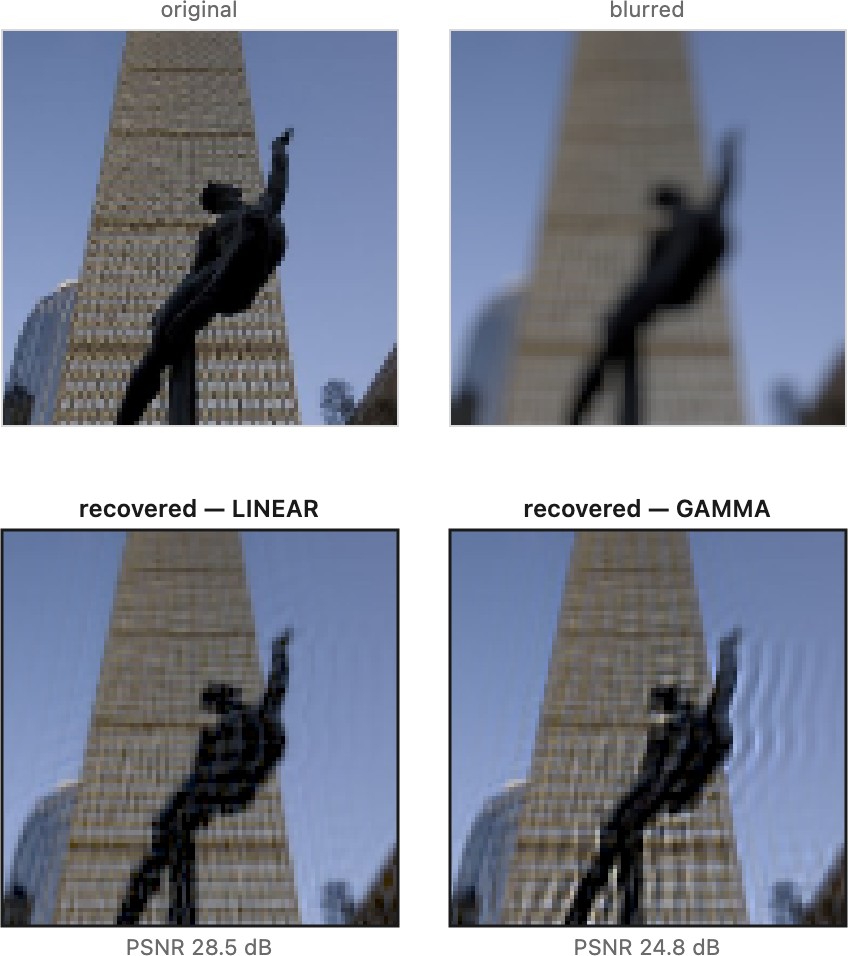
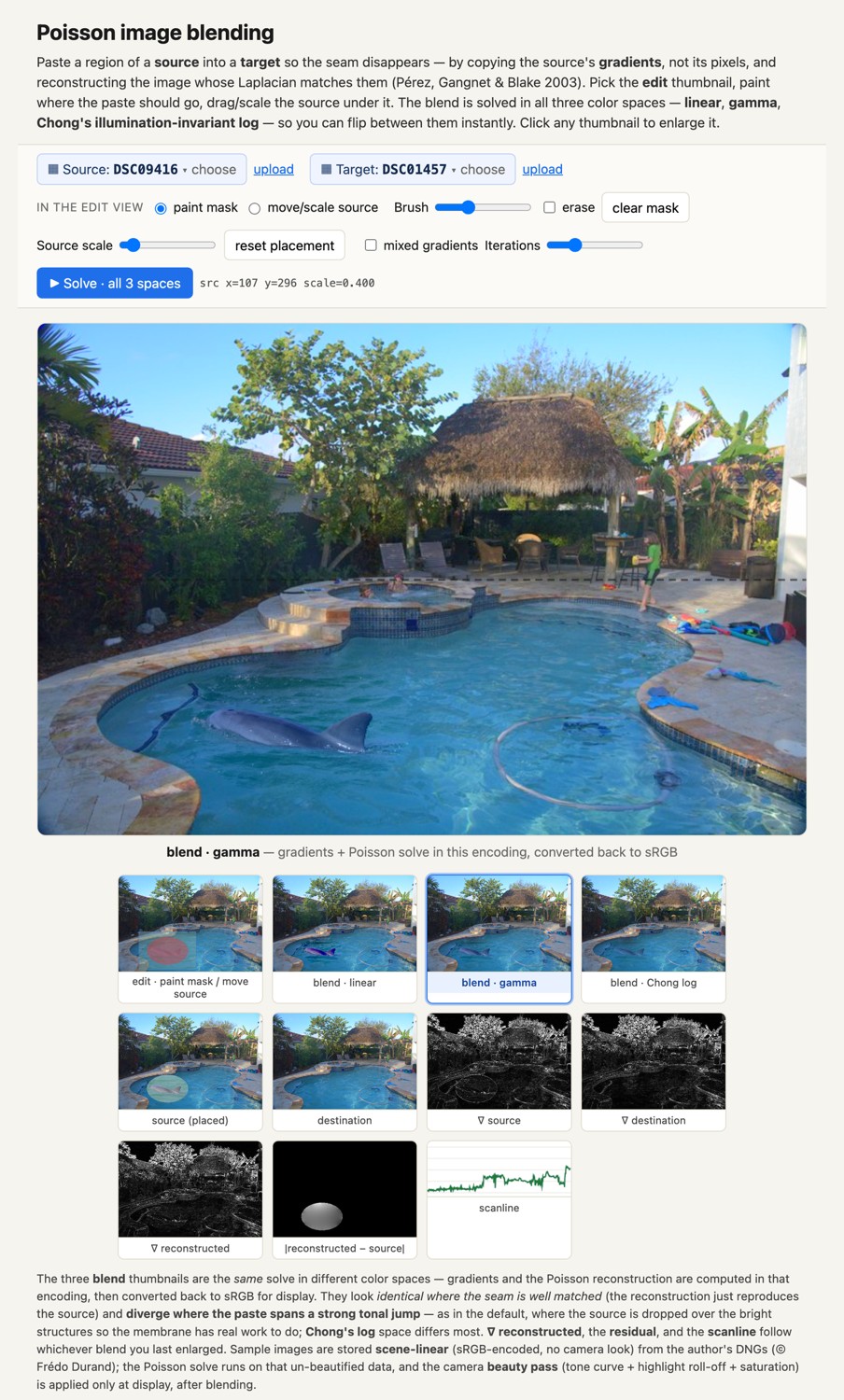
Two quick illustrations, one from each side of the encoding coin. Deblurring undoes a physical blur of light, so it must run in linear (Figure 4.2.1); done on gamma values it rings and halos. And even an operation as innocent as pasting one photo into another gives a different result depending on the space you solve it in (Figure 4.2.2, revisited fully in Poisson image editing).
There is a further wrinkle worth naming: the values in a finished JPEG, or a scanned film frame, are usually not even a clean gamma encoding of scene light. The camera's processor (or the film's chemistry) has already applied tone curves, saturation boosts, and contrast S-curves to make the picture look good straight out of the camera — beautification, not measurement. So a consumer JPEG is roughly: scene light → camera "look" → gamma → 8-bit, with the physical meaning of the numbers scrambled along the way.
The practical upshot is a discipline and a corollary. The discipline: whenever we introduce an operation, we state plainly which encoding it assumes, and we say plainly when we encode and when we decode. The mistake is never picking a space — it is not knowing which one you are in. The corollary, worth absorbing now: starting from calibrated, linear, radiometric values (RAW, before all the cooking) gives you a principled way to edit — exposures that add up, colors that mix correctly — whereas the older, pre-digital approaches were necessarily more hand-wavy, because the numbers' meaning was never pinned down.
There is a clean way to think about what we wish our tools did here, borrowed from programming languages: the encoding and color space ought to be part of the pixel's type, not a fact kept in the programmer's head. In a well-typed numeric language you cannot silently add a length in meters to one in feet — the type system either inserts a conversion or refuses to compile — and units libraries make that explicit. Image code should work the same way: a value should know it is linear-sRGB or gamma-DisplayP3 or log-ACEScc, an operation that demands linear light should refuse (or automatically convert) a gamma-encoded input, and converting between spaces should be a deliberate cast — implicit where the conversion is safe and well-defined, explicit where it loses information or the intent is ambiguous. Almost every "why are my colors wrong / my blend dark / my HDR muddy" bug is, in this light, a type error that no current tool was typed strongly enough to catch: a linear operation fed gamma data, or two images in different spaces added without a cast. The big tone- and color-pipeline disciplines later in the book — process in scene-linear, encode only at display — are exactly the manual bookkeeping a real type system would do for us; treating encoding as provenance the image carries (the metadata wish above) is the first step toward making the compiler, not the programmer, responsible for getting it right.
The numbers in an image array carry no meaning by themselves. The same triple (0.5, 0.2, 0.1) is a different color — and a different amount of light — depending on two things the array does not contain:
- its color space — which primaries and white point those R, G, B refer to (sRGB? Adobe RGB? Display P3? a camera's native raw space?); and
- its value encoding — how a stored number maps to light (linear, gamma, log, or a camera "look" curve).
Strip those two away and you are left with a grid of anonymous numbers. Every operation that matters later — white balance, HDR merging, blur and deblur, any color conversion — silently assumes a particular answer to both questions, and gets the wrong result if the assumption is wrong. Hence the discipline of the whole book: never touch a pixel without knowing its color space and its value encoding. When two "identical" images don't match, this is almost always why.
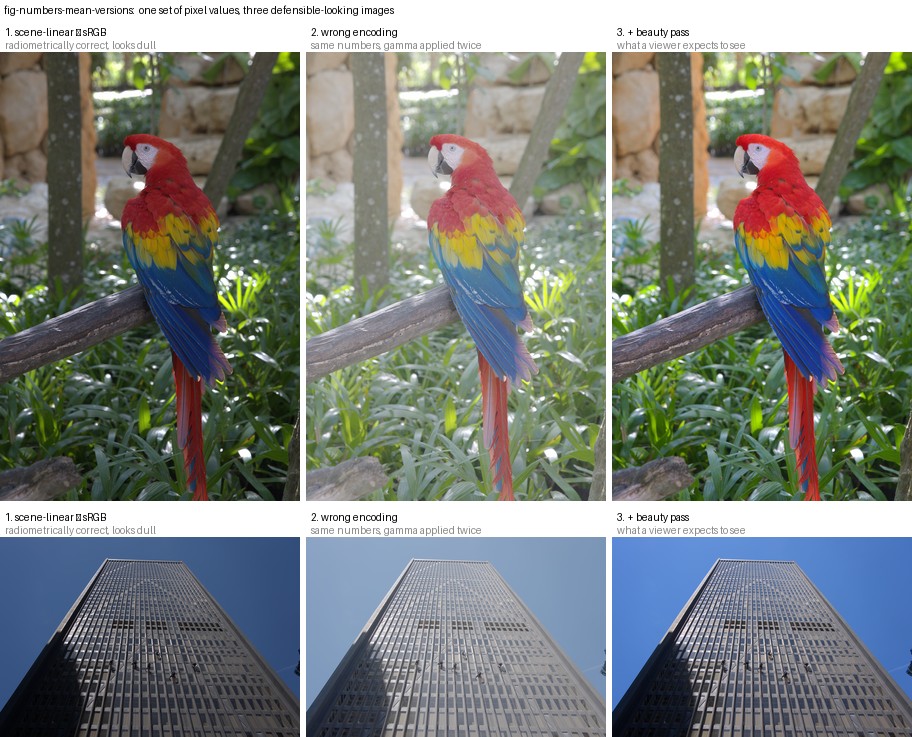
How much trouble this caveat hides only becomes clear when you try to turn one concrete set of numbers — the raw measurements in a camera DNG — into the image the photographer actually saw. It is not straightforward, and it is remarkably easy to get wrong: the same sensor values can be rendered dull or punchy, neutral or faintly warm, with a clean sky or a magenta one, and every one of those wrong versions looks plausible (Figure 4.2.3). The full, replicable recipe, demosaic, white balance, the color matrix, exposure, and the camera "look" curve we call the beauty pass, together with a catalog of the easy mistakes, lives in the DNG-rendering appendix. The lesson to carry from here is just the discipline above, made vivid: a grid of numbers is not a picture until you commit to its color space, its encoding, and — for a raw file — a whole recipe besides.
4.2.2 What the numbers actually mean: color spaces⧉
Those three letters, "RGB," hide more than they reveal. Several independent decisions all travel under the same name, which is why two arrays can both be rightly called "RGB" and still be incompatible. It is worth listing them once:
| what varies | examples | where it bites | |
|---|---|---|---|
| channel order | RGB vs BGR (OpenCV) | red and blue swap silently | |
| color space / primaries | sRGB vs Adobe RGB vs Display P3 | same numbers, different actual colors → [[Measuring and encoding color | Color technology]] |
| encoding | linear vs gamma | the section above | |
| range | $[0, 1]$ float vs $[0, 255]$ uint8 vs 10/12-bit | scale factors, overflow | |
| alpha convention | premultiplied vs straight | → Compositing |
A bare array announces none of this — the information lives in metadata (the file header, an embedded ICC color profile). The advice is correspondingly simple: read the metadata, don't assume. When two images that "should" match stubbornly don't, this table is the first place to look.
Recap: big lessons of this chapter
The numbers in an image array carry no meaning by themselves. The same triple (0.5, 0.2, 0.1) is a different color — and a different amount of light — depending on two things the array does not contain:
- its color space — which primaries and white point those R, G, B refer to (sRGB? Adobe RGB? Display P3? a camera's native raw space?); and
- its value encoding — how a stored number maps to light (linear, gamma, log, or a camera "look" curve).
Strip those two away and you are left with a grid of anonymous numbers. Every operation that matters later — white balance, HDR merging, blur and deblur, any color conversion — silently assumes a particular answer to both questions, and gets the wrong result if the assumption is wrong. Hence the discipline of the whole book: never touch a pixel without knowing its color space and its value encoding. When two "identical" images don't match, this is almost always why.